HCFS Architecture Diagrams
Three views of the HCFS system, each rendered as a standalone SVG. Click through for a crisp, zoomable render.
| # | Diagram | What it shows |
|---|---|---|
| 1 | Overall architecture | Both client protocols (HCFS native + S3-compatible gateway), the axum server, and the Arion storage plane in one picture |
| 2 | Server ingestion (HCFS vs S3 gateway) | Side-by-side lanes of the two /upload paths, from request shape to FileRecord |
| 3 | Sync engine (three-tree) | Input trees → SyncPlan::build → execution → outcome, with the full classification matrix |
1 · Overall architecture
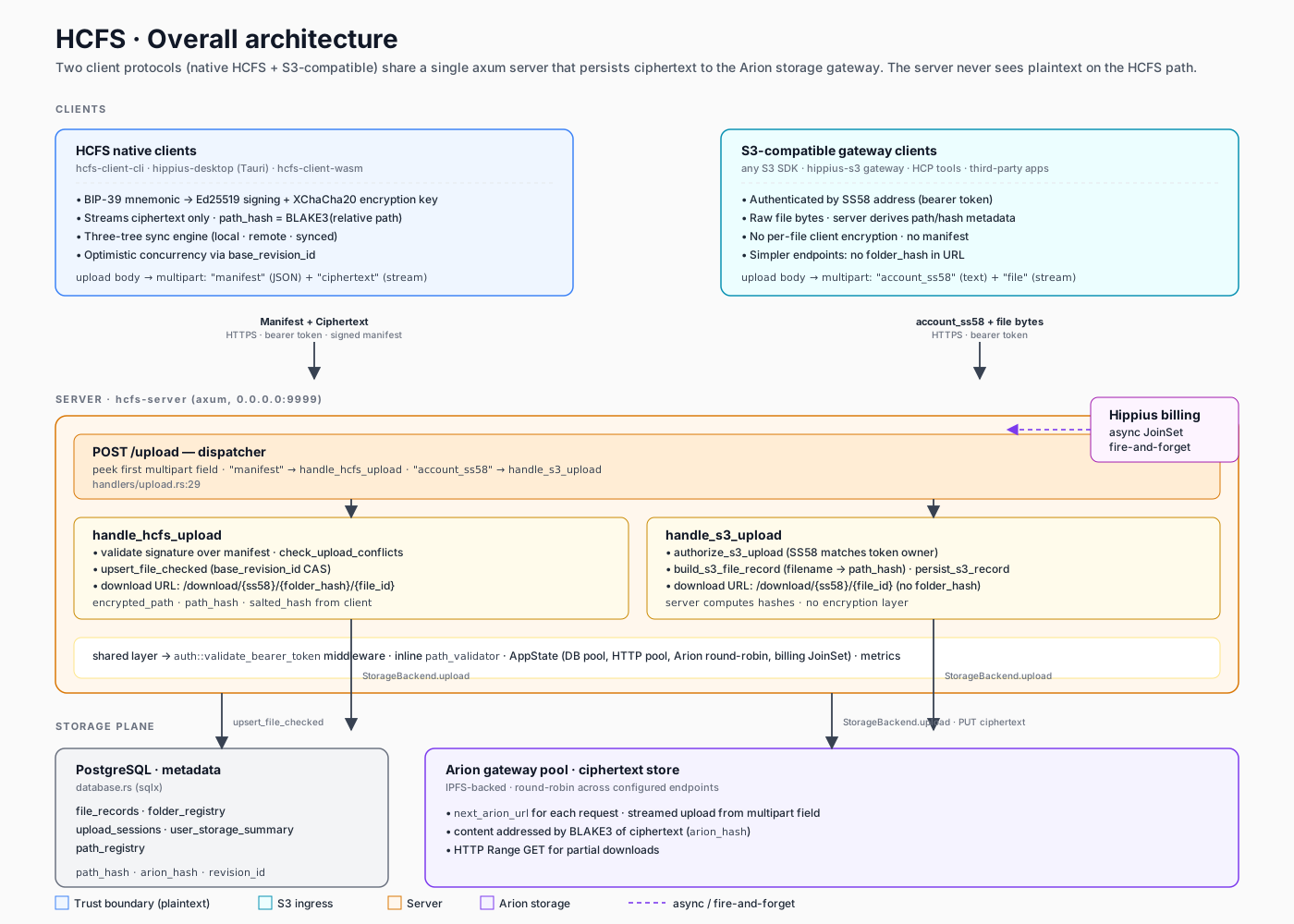
Native HCFS clients and S3-compatible gateway clients both terminate at the same axum server. The server peeks the first multipart field of /upload to dispatch. All ciphertext + metadata converges on the Arion storage gateway and a PostgreSQL row in file_records. Billing pushes run as fire-and-forget Tokio tasks.
Sources: hcfs-server/src/handlers/upload.rs, hcfs-server/src/state.rs, hcfs-server/src/storage.rs.
2 · Server ingestion — HCFS vs S3 gateway
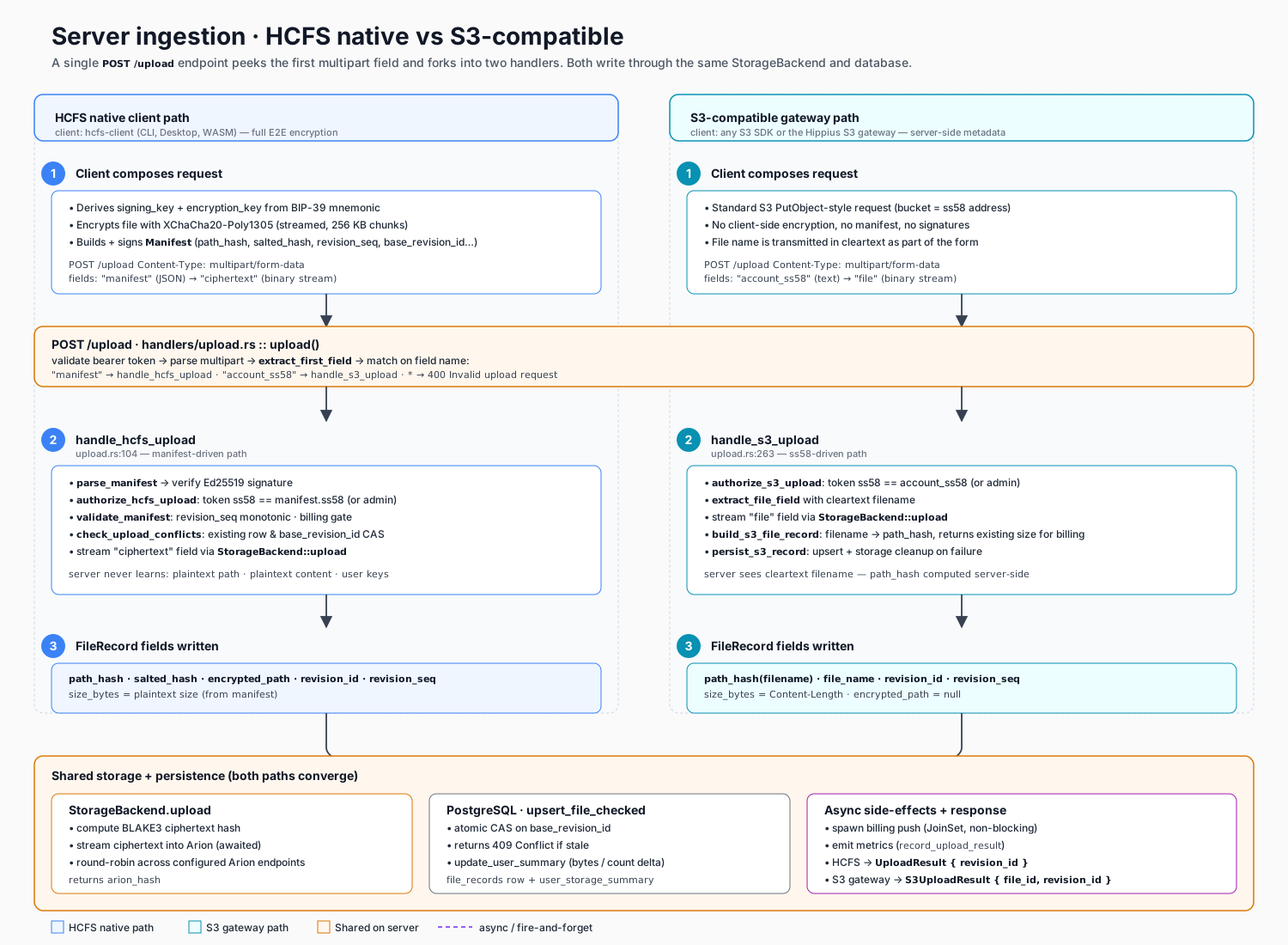
Both clients hit POST /upload. The first multipart field decides the path:
"manifest"→handle_hcfs_upload— signed manifest, client-side encryption,path_hashandsalted_hashcomputed on the client. Server authorizes withauthorize_hcfs_upload, checks revision CAS, streams the ciphertext field to storage."account_ss58"→handle_s3_upload— plain multipart with a cleartext filename. Server authorizes withauthorize_s3_upload(token SS58 must match account), streams the file to storage, thenbuild_s3_file_recordderivespath_hashfrom the filename andpersist_s3_recordwrites the row.
After the handler split, both paths converge on the shared StorageBackend.upload + upsert_file_checked + async billing tail. Download URLs differ too: HCFS uses /download/{ss58}/{folder_hash}/{file_id}; S3 gateway clients use /download/{ss58}/{file_id} (see download_no_folder in hcfs-server/src/handlers/file.rs).
Sources: hcfs-server/src/handlers/upload.rs, hcfs-server/src/handlers/helpers.rs, hcfs-server/src/storage.rs, hcfs-server/src/database.rs.
3 · Sync engine (three-tree)
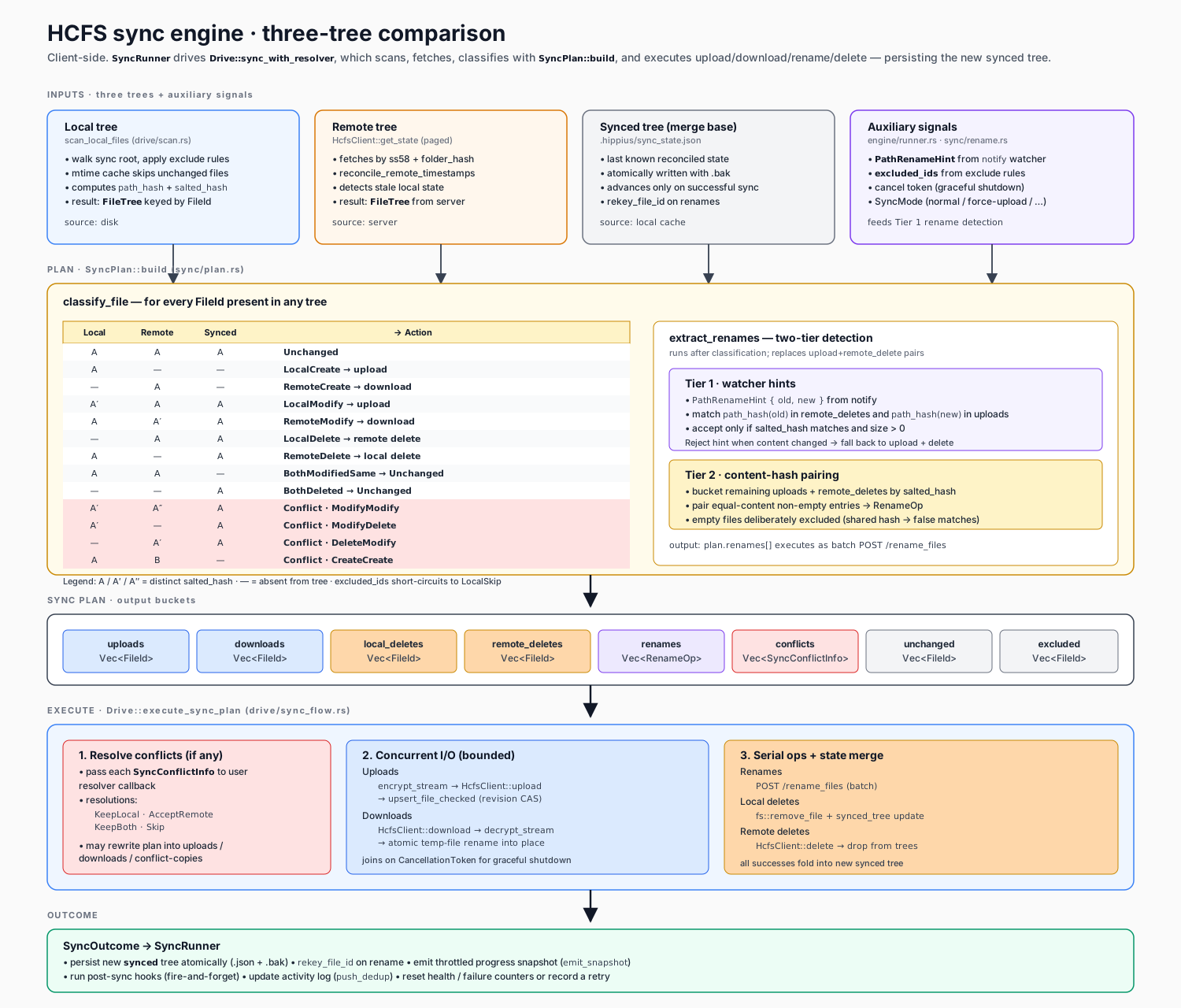
hcfs-client keeps three FileTrees — local (scanned from disk), remote (fetched via HcfsClient::get_state), and synced (last known reconciled state, persisted in .hippius/sync_state.json). SyncPlan::build classifies every FileId via the matrix in the diagram and sorts it into action buckets. A second pass, extract_renames, promotes matching upload/delete pairs into RenameOps using Tier-1 watcher hints first, then Tier-2 content-hash pairing.
Execution is driven by Drive::execute_sync_plan:
- Resolve any conflicts via the caller-supplied
conflict_resolvercallback (KeepLocal,AcceptRemote,KeepBoth,Skip). - Run uploads and downloads concurrently (bounded; cancellable via
CancellationToken). - Run renames (batch
POST /rename_files), then serial local/remote deletes. - Fold successes into a new
syncedtree, persist atomically, and hand theSyncOutcomeback toSyncRunnerfor activity-log and health tracking.
Sources: hcfs-client/src/sync/plan.rs, hcfs-client/src/sync/conflict.rs, hcfs-client/src/sync/rename.rs, hcfs-client/src/drive/sync_flow.rs, hcfs-client/src/engine/runner.rs.
Editing the diagrams
These are hand-authored SVG files — open them in any editor (VS Code renders them inline) or a vector tool like Figma/Inkscape. The styling is centralized in each file's <defs><style> block:
--fillfamilies:#eff6ff(HCFS/client trust),#ecfeff(S3 gateway ingress),#fff7ed(server),#f5f3ff(Arion storage),#fee2e2(conflicts).- Arrows: solid
#374151for synchronous flow, dashed#7c3aedfor fire-and-forget or async side effects. - Fonts use system stacks so GitHub / browsers render consistently without external assets.
If you regenerate these from another source (draw.io, D2, etc.), keep the filenames stable so the links above don't break.