Staking
Introduction
Staking lets you lock your hAlpha tokens to help secure the Hippius network. Your staked tokens earn rewards over time. When you're ready, you can unstake your tokens. They enter an unbonding period before becoming available to withdraw.
The Hippius Desktop app provides a seamless staking experience with local wallet signing, so you never need to expose your mnemonic phrase to external extensions.
Staking Overview Widget
The Stake hAlpha widget on the Wallet Overview page gives you a quick snapshot of your staking status:
| Field | Description |
|---|---|
| Total Staked | Your actively bonded hALPHA |
| Total Locked | Combined total of bonded + unbonding + redeemable amounts (shown with a lock icon) |
| Unbonding | Tokens currently in the unbonding period, shown with a clock icon and estimated remaining time (e.g., "~1d 14h remaining") |
| Redeemable | Tokens that have finished unbonding and are ready to withdraw (shown with an unlock icon) |
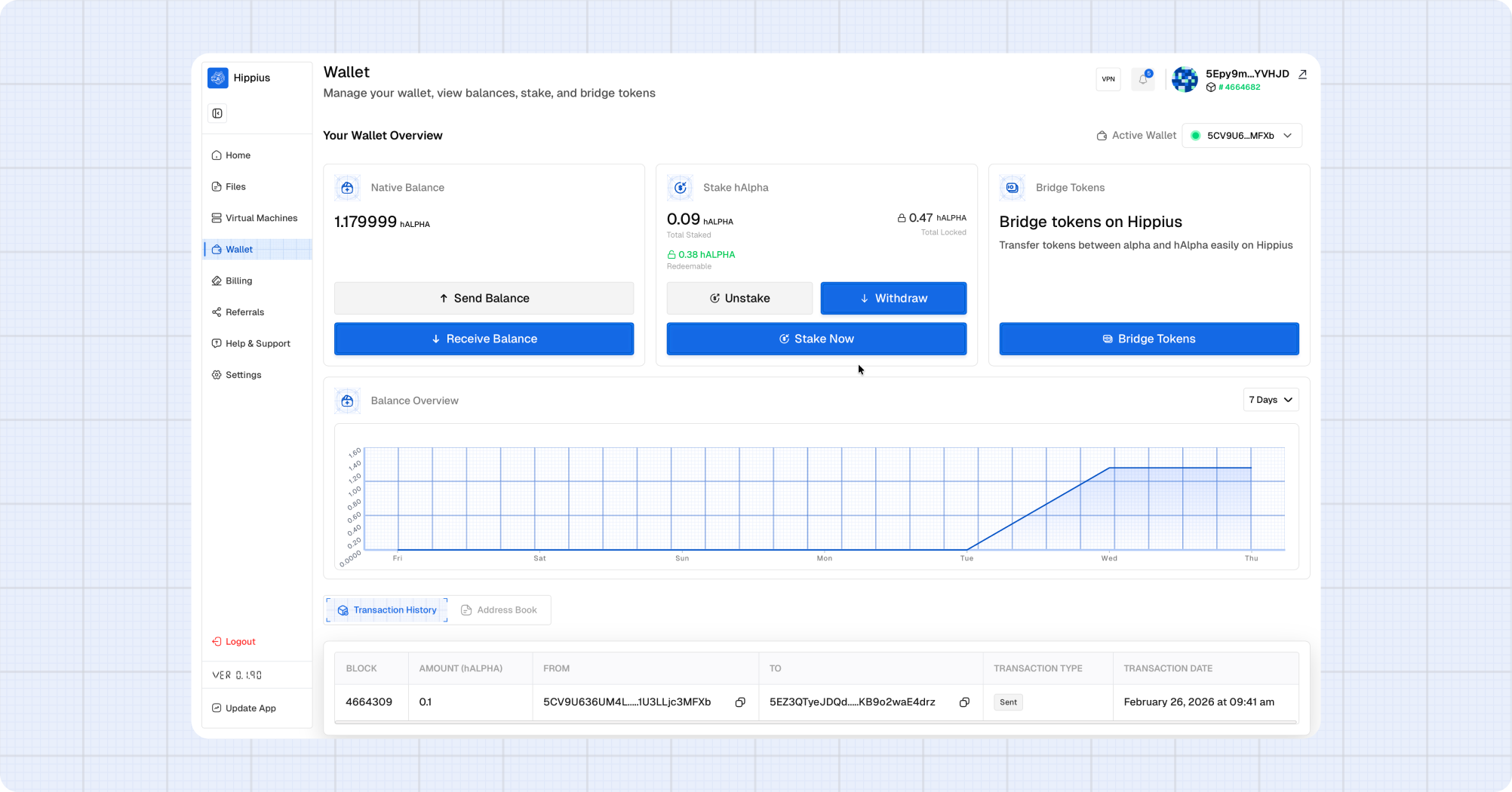
Hover over the unbonding amount to see detailed information for each unbonding period, including the exact number of blocks remaining and the estimated time.
Accessing Staking
You can access staking features in multiple ways:
- Click Stake Now on the Stake widget on the Wallet page
- Navigate to the Stake page from the sidebar
- Use the Bridge tab which includes staking options
Staking hAlpha
- Open the Wallet page and ensure the correct wallet is active.
- Click Stake Now on the Stake widget, or navigate to the Stake page.
- Your available balance (excluding already staked and unbonding tokens) is shown at the top.
- Enter the amount you wish to stake. Click Max to stake your full available balance.
- Click Stake Now.
- Review the confirmation dialog. Note that this transaction cannot be reversed.
- Enter your wallet password to sign the transaction.
- Click Confirm.
A loading notification will appear while the staking transaction is processed. Once confirmed, your staked balance will update automatically.
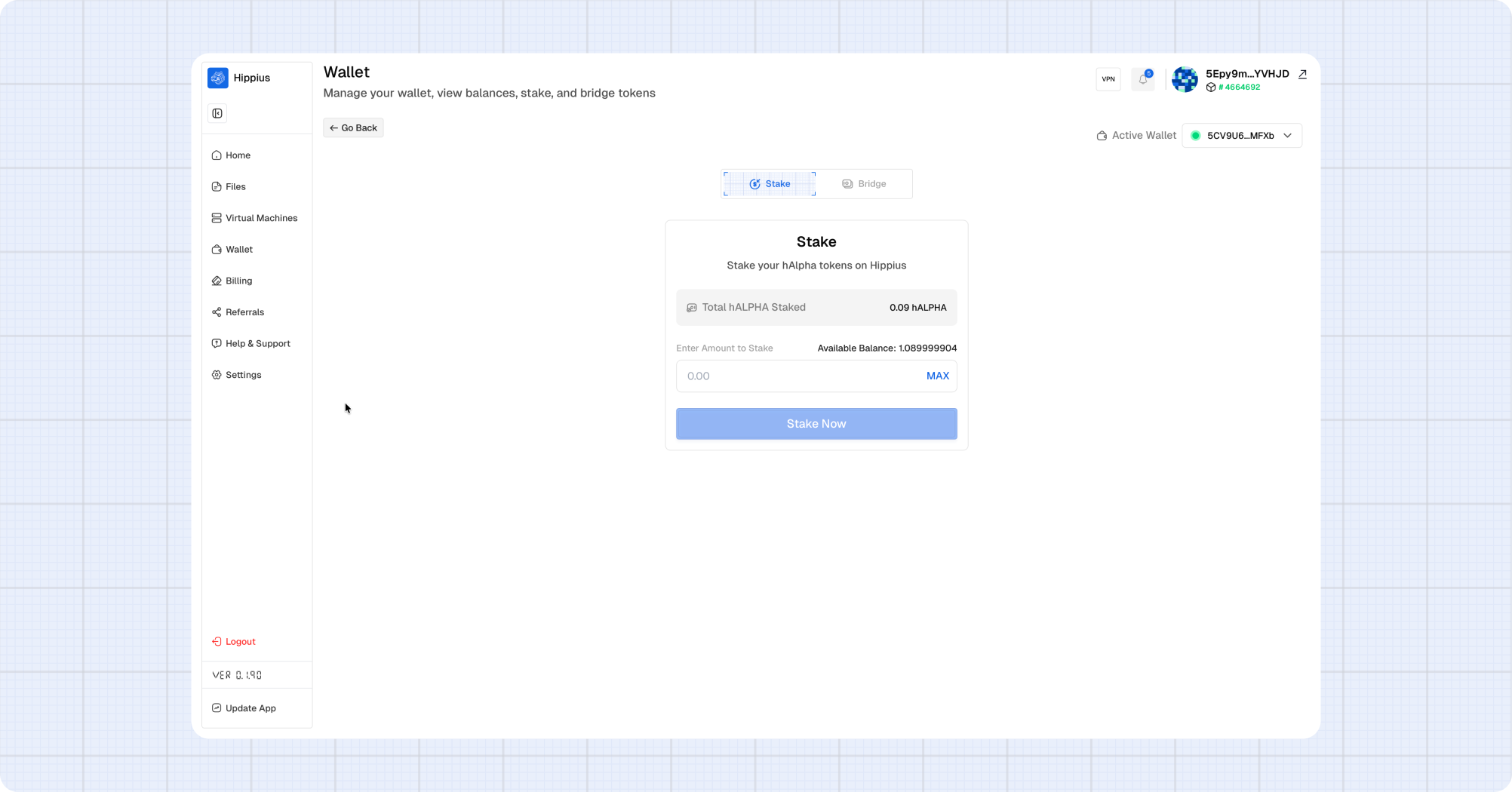
If you already have staked tokens, additional stakes are added to your existing bond automatically. You don't need to do anything different.
Unstaking hAlpha
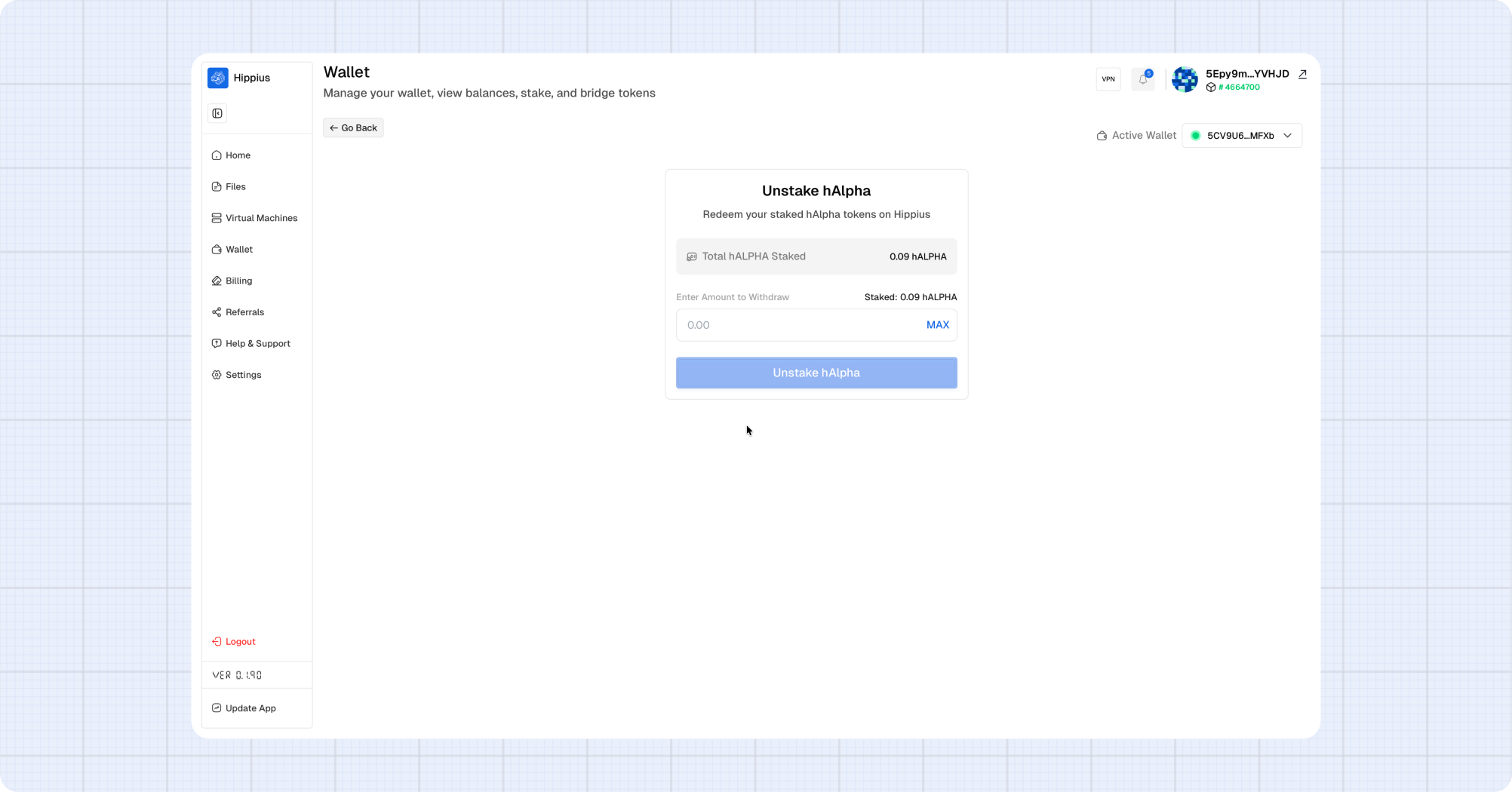
Unstaking schedules your staked tokens for release. They enter an unbonding period before becoming withdrawable.
- Open the Wallet page and click Unstake on the Stake widget, or navigate to the Unstake page.
- Ensure the correct wallet is active.
- Your current staked balance is shown at the top.
- Enter the amount you wish to unstake.
- Click Unstake hAlpha.
- Review the confirmation dialog. Note the warning about the unbonding period.
- Enter your wallet password to sign the transaction.
- Click Confirm.
After confirmation, the unstaked amount moves to Unbonding status. You can track the remaining time on the Stake widget.
Withdrawing Redeemable Tokens
Once the unbonding period is complete, your tokens become Redeemable and can be withdrawn to your wallet balance.
- Open the Wallet page. The Stake widget will show your redeemable amount in green.
- Click Withdraw.
- Review the amount shown in the confirmation dialog.
- Enter your wallet password to sign the transaction.
- Click Confirm Withdraw.
The dialog closes immediately and a loading notification tracks the withdrawal progress. Once confirmed, the tokens are added back to your transferable balance.
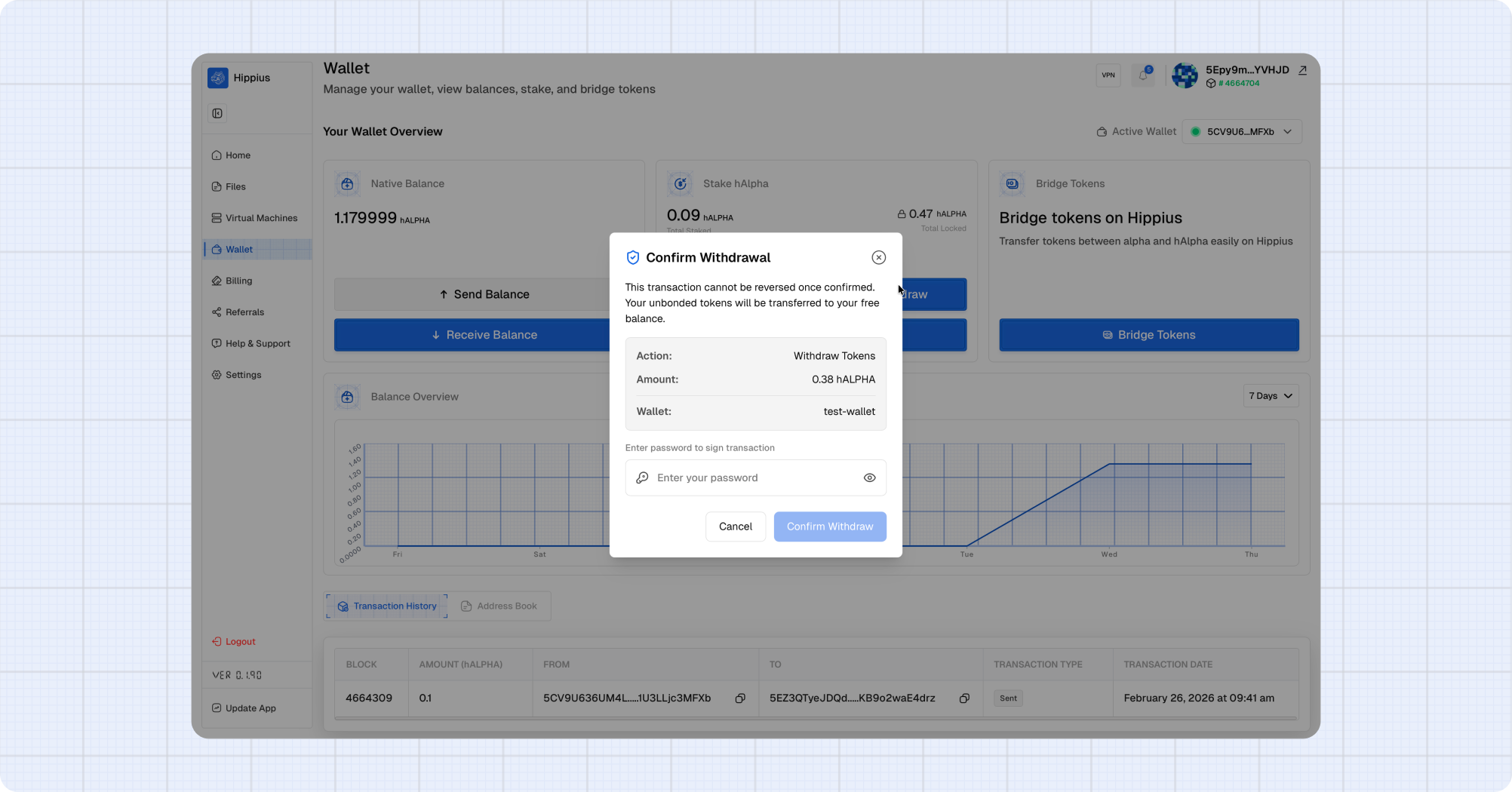
The Withdraw button only appears when you have redeemable tokens. If all your tokens are still unbonding, you'll see the remaining time instead.
Understanding Token States
Your hAlpha tokens can be in several states:
Transferable → [Stake] → Bonded (Staked)
                              ↓ [Unstake]
                         Unbonding (waiting period)
                              ↓ (period complete)
                         Redeemable
                              ↓ [Withdraw]
                         Transferable
| State | Can Transfer? | Can Stake More? | Can Unstake? | Can Withdraw? |
|---|---|---|---|---|
| Transferable | Yes | Yes | — | — |
| Bonded (Staked) | No | Yes (adds to bond) | Yes | — |
| Unbonding | No | No | No | Not yet |
| Redeemable | No | No | No | Yes |
Staking Rewards
Staked tokens earn rewards proportional to:
- The amount staked
- The duration of staking
- The overall network staking participation
Rewards are automatically added to your staked balance. You don't need to manually claim them.
Transaction Signing with Local Wallets
Unlike the web version which requires browser extension wallets, Hippius Desktop uses your local wallet to sign staking transactions:
- All transaction signing happens locally on your device
- Your mnemonic phrase never leaves your computer
- You simply enter your wallet password to authorize transactions
This provides enhanced security while maintaining a smooth user experience.
Make sure your wallet is unlocked before attempting staking operations. If your session has expired, you'll be prompted to enter your password again.
Frequently Asked Questions
1. How long is the unbonding period?
The unbonding period is set by the network and is typically several days. The exact duration is shown in the Stake widget when you have unbonding tokens.
2. Can I cancel an unstake?
No, once you've initiated an unstake, you cannot cancel it. The tokens will complete the unbonding period before becoming withdrawable.
3. Do I earn rewards while unbonding?
No, tokens in the unbonding state do not earn staking rewards. Only actively bonded (staked) tokens earn rewards.
4. Is there a minimum stake amount?
The network may enforce a minimum stake amount. If your stake is below this minimum, you'll see an error when attempting to stake.
5. Can I stake from multiple wallets?
Yes, you can stake from any wallet you have added to Hippius Desktop. Each wallet's stake is tracked independently.