Settings
Introduction
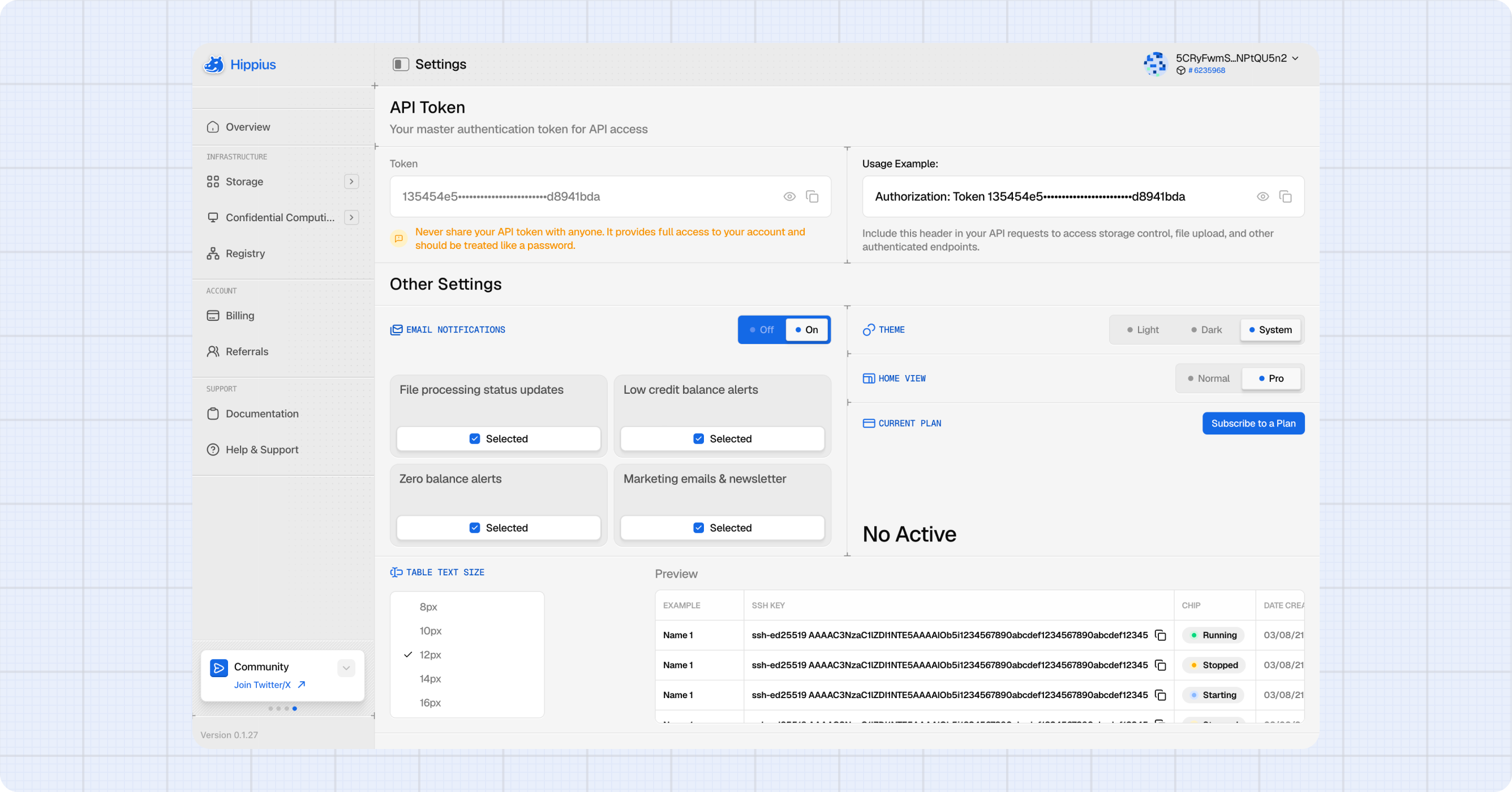
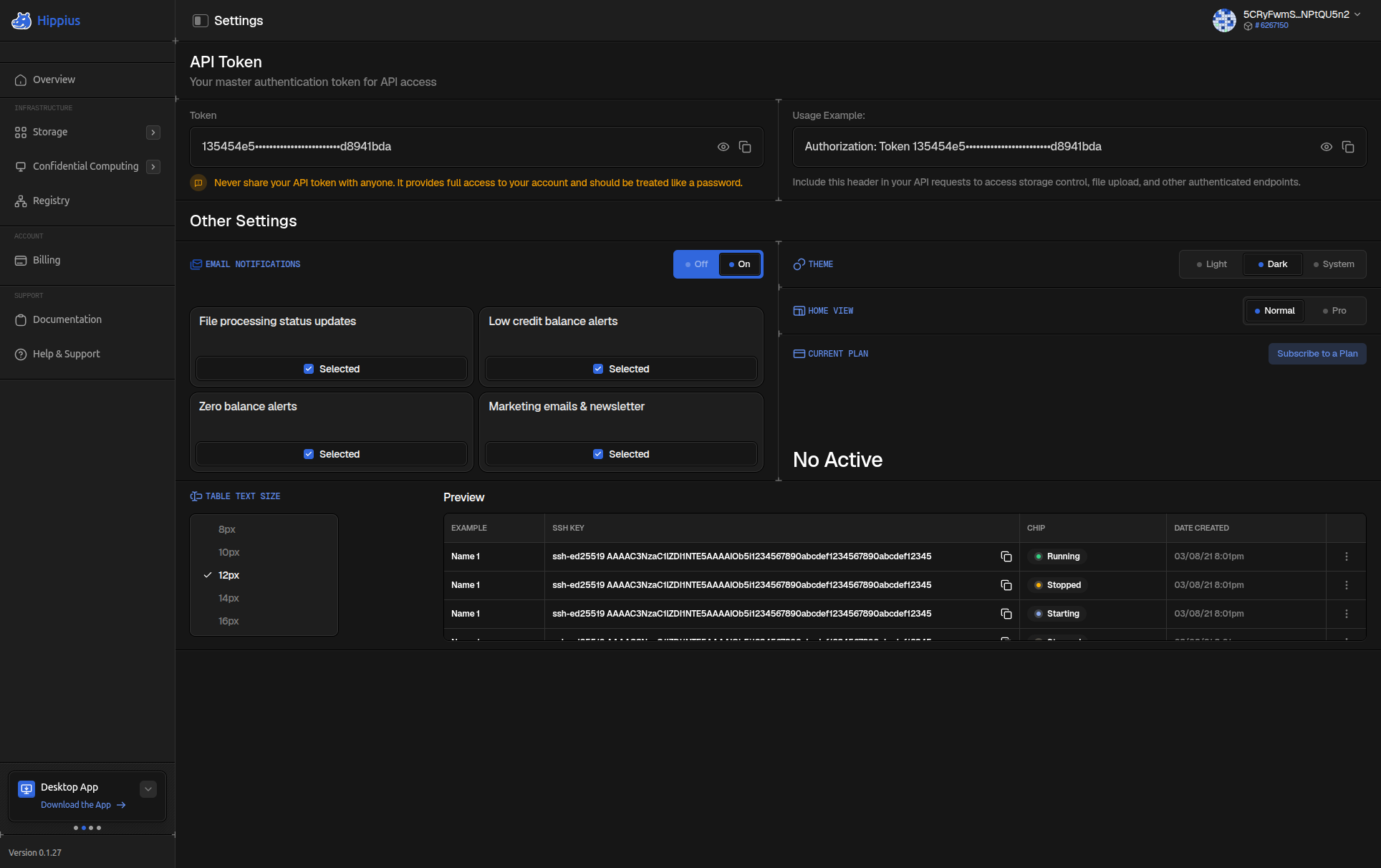
The Settings page is where you personalise the console and manage your account preferences. You can grab your API token, control which emails Hippius sends you, switch between light and dark mode, change your dashboard layout, adjust table density, and manage your subscription plan.
To reach Settings, click the Hippius dropdown in the top left of the sidebar, then click Settings from the menu that appears.
All changes save automatically. There is no save button anywhere on this page.
API Token
Your API Token lets you make direct API calls to Hippius on your behalf, for example in a script or integration.
The token is hidden by default. Click the eye icon to reveal it, then the copy icon to copy it to your clipboard. Click the eye again to hide it.
Authorization: Bearer <your-token>
See Hippius API for available endpoints.
Anyone with this token has full access to your account. Never paste it into public documents, repositories, screenshots, or chat messages. If you believe it has been compromised, contact our support team immediately.
Email Notifications
Control which emails Hippius sends you. There's a master on/off switch at the top, and four individual toggles below it.
When the master switch is off, no emails are sent regardless of the individual settings. When it's on, each toggle controls its specific notification type:
| Notification | What it sends |
|---|---|
| File processing status updates | Emails when your uploads finish processing through the Hippius pipeline. |
| Low credit balance alerts | An email when your balance drops below a set threshold. |
| Zero balance alerts | An email when you run out of credits and uploads are paused. |
| Marketing emails & newsletter | Product updates, announcements, and occasional offers. |
Click any toggle to flip it. The change saves immediately.
Theme
Pick Light or Dark. The change applies instantly and persists across all your sessions and devices.
Home View
Choose between two dashboard layouts:
Normal gives you a focused overview: your recent uploads, credit balance, and storage usage. Best if you're mainly using Hippius for personal file storage.
Pro expands the dashboard with your Drive and S3 sections side by side, detailed storage and credit charts, and recent uploads. Best if you actively manage multiple services.
The change takes effect the next time you load the Overview page (or immediately if you're already on it).
Table Text Size
Choose how rows look across all tables in the console. Drive, S3, and Billing tabs all follow this setting.
| Option | Best for |
|---|---|
| Compact | Seeing more rows at once on large monitors or dense data sets. |
| Comfortable (default) | Balanced spacing for everyday use. |
| Spacious | Easier reading during long sessions or on smaller screens. |
A preview row at the top of this section updates live as you switch options, so you can see the difference before committing.
Current Plan
If you have an active subscription, this section shows your plan name, monthly credit allocation, next billing date, and an action menu (three dots) with options to Change Plan or Cancel Subscription.
If you don't have a plan yet, a shortcut card points you to the Billing page where you can subscribe.
You can also cancel directly from the Billing page by finding your active plan card and clicking Cancel Subscription there. For a full comparison of plans and instructions for switching or cancelling, see Billing → Subscription Plans.
Delete Account
The last row on the page deletes your account and everything in it. You do the whole thing yourself, in the console — there is no support ticket to raise and no form to fill in, whichever way you sign in.
Deleting is not instant. Your account is locked the moment you confirm, and permanently deleted 7 days later. Those 7 days are a grace period: until the deletion runs you can still stop it and get everything back.
Your files, buckets, container images, subscriptions and remaining credits all go. After the 7 days there is nothing left to restore, and no copy on our side to restore it from.
What gets deleted
The first screen of the dialog is not a warning, it is an inventory. It reads your account live and lists what is actually there, in six groups:
| Group | What it covers |
|---|---|
| Storage | Everything in Drive and in your S3 buckets. |
| Compute | Virtual machines and managed databases. |
| Registry and network | Container registry projects and images, and your network peers. |
| Subscriptions | Any active Drive, S3 or Registry plan, which is cancelled. |
| Credits | Your remaining balance, which is forfeited, and any saved card. |
| Access and account | API tokens, S3 keys, SSH keys and every way of signing in. |
Only groups that hold something get a checkbox to tick. A group that is empty collapses to a single grey line, so you are only asked to confirm what you actually have.
Confidential Computing — virtual machines and managed databases — and the network rail are not generally available yet. If your account doesn't have them, the Compute group simply reads "No VMs or databases" and the network half of Registry and network is empty. Nothing to tick, and nothing that can hold your deletion up. Container registry is live and does appear.
If you are on the beta and have a running VM or managed database, that blocks the request until it is decommissioned. The dialog says so and links straight to the pages where you can shut them down.
Deleting your account
Click Delete my account to open the dialog.
Everyone finishes by typing the confirmation phrase. The only thing that differs is whether there is an email step before it:
| How you sign in | Steps |
|---|---|
| Email or social login (Google, GitHub, Apple) | 3 — inventory, emailed code, phrase |
| Recovery seed or access key | 2 — inventory, phrase |
A wallet-only account is deleted in exactly the same way, on exactly the same 7 day schedule. It simply has no mailbox to send a code to, so that one screen does not exist and the counter reads "of 2" instead of "of 3". Nothing else changes, and you do not need to contact anyone.
Step 1 — What will be deleted. Read the inventory and tick each group's checkbox. Continue stays disabled until every group that holds something is ticked.
Step 2 — Prove it's you. Email and social logins only. Hippius emails you a 6-digit code as soon as this screen opens; you don't have to ask for it. The code expires in 15 minutes. If it doesn't arrive, use Resend at the bottom, which becomes available again 60 seconds after each send.
Last step — Type to confirm. Type delete my account exactly, then click Delete my account and everything in it. This screen is shown to everyone: it is step 3 of 3 with an email address on the account, and step 2 of 2 without one.
What happens right after
You are not dropped back at a login form. The console takes you to a page headed Your account is locked, which gives the exact date the account will be deleted, says how to keep it, and offers a Back to Hippius button. That page is public, so you can leave it open, bookmark it, or come back to it — it does not need a session.
Behind that, three things have happened at once:
- Your account is locked. Drive and S3 are suspended, and every API token and session is revoked — including the one you were just using, which is why you are signed out. Scripts and integrations stop working straight away.
- The deletion is scheduled for 7 days later.
- If the account has an email address, the cancel link is sent to it.
Nothing is erased yet. Everything you own still exists, untouched, until that date.
Changing your mind
You have the whole grace period to stop the deletion. How you do it depends on how you sign in.
If your account has an email address, use the cancel link in the email we send you when the deletion is scheduled. It works without signing in, which matters, because your sessions were revoked when you confirmed.
If you sign in with a recovery seed or an access key there is no email, so the cancel link doesn't apply. Instead:
- Sign in again with your wallet. A locked account can still sign in.
- Open Settings.
- The Delete account row now reads Scheduled for deletion on …. Click Cancel deletion.
Either way the result is the same: your account is active again, the lock is lifted, and nothing was deleted.
While a deletion is scheduled the console still opens, but the account stays locked and most pages will be empty or show an error. That is expected. Until you actually press Cancel deletion, the countdown is still running.
Some deletions are final from the moment they are confirmed. When that is the case the dialog says so in amber, "This cannot be cancelled once confirmed", before you commit, and the page afterwards repeats it. If you see that line, treat the button as the last decision.
Where to next
- Billing: manage credits and subscriptions in detail.
- Help & Support: open a ticket if something isn't working as expected.
- Getting Started: a refresher on signing in and navigating the console.